Categories
Author: Beth Rush


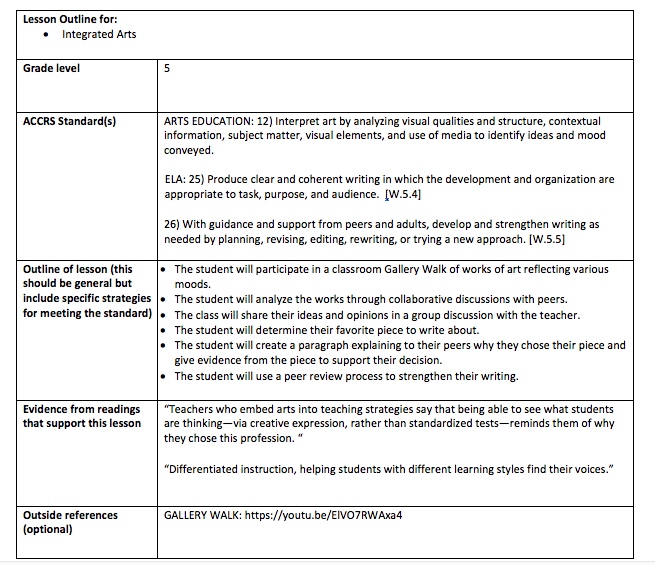
Integrated Arts
The article Arts Integration Improves School Culture and Student Success by Cheri Sterman (2018) offers a look into the positive impact that arts education has on school and student success. According to L. Earl Franks, arts education is “an essential part of well-rounded education.” There are many benefits to integrating arts education in the curriculum. Integrating the arts results in higher student engagement, a collaborative learning environment, attracting and keeping teachers in schools, and allowing teachers to use culturally responsive pedagogy. It also provides a way to easily differentiate instruction and encourage creative problem-solving that leads to career readiness. Arts integration has proven results of enhancing overall student achievement, as well.
Having studied art education in my undergraduate degree, I was most intrigued by the statistics that prove the increased success in student test results and increased math and reading proficiencies. Art educators are often forced to validate their work that is not quantifiable. However, through integrating the arts into the daily classroom, we can see clear quantitative results. Also, I had not considered the impact that arts education can have on ELLs. We must consider the use of universal languages like the arts to help ELLs find success in the learning environment.
References
Sterman, C. (2018, January/February). Arts integration improves school culture and student success. Retrieved from https://www.naesp.org/principal-januaryfebruary-2018-comprehensive-learning/arts-integration-improves-school-culture-and-s
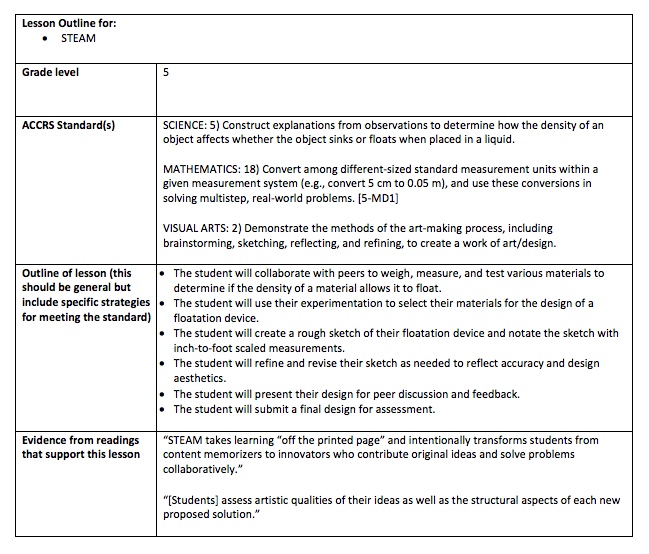
STEAM
In the article STEAM Ignites Learners’ Energy, Cheri Sterman (2017) relates the ideas of using STEAM and student-centered learning to create leaders out of learners. By adjusting the learning environment to focus on students’ creative success and execution of projects, students become more engaged and able to work within real-world standards. STEAM encourages students to be intuitive investigators who are able to analyze problems on a higher thinking level. Beyond this, STEAM also sparks innovation and invention in students, requiring the engineering and design of new projects. Schools that utilize the STEAM pedagogy to engage students also see higher test scores and lower discipline referrals.
STEAM is a very important concept in my teaching career. I plan to focus my teaching in math and sciences with the integration of the creative thinking of the arts. It is very important that we prepare our students as best we can for their future in the real world. STEAM is an overdue bridge for the disconnect between education and the real world. It is also important that we develop leadership qualities in our students as our world is in dire need of thoughtful, well-rounded, educated leaders.
References
Sterman, C. (2017, September/October). STEAM ignites learners’ energy. Retrieved from https://www.naesp.org/principal-supplement-septemberoctober-2017-champion-creatively-alive-children/steam-ignites-learners
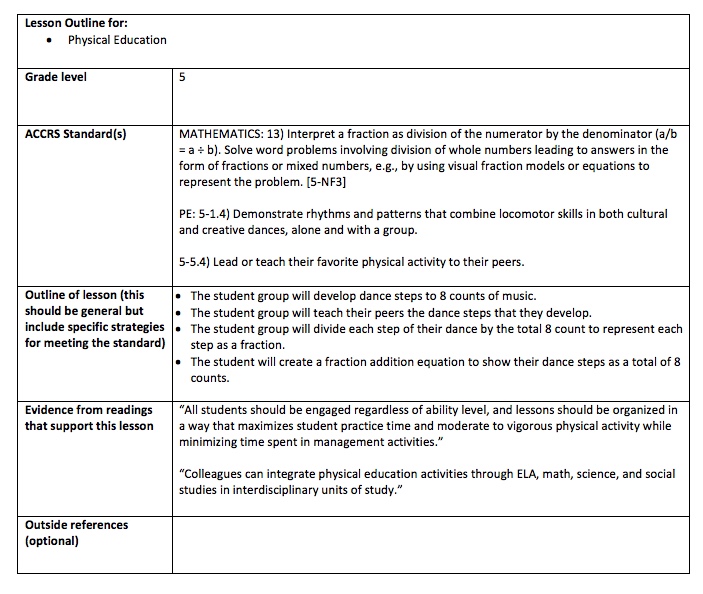
Physical Education
The article Shake Up PE’s Status Quo by John T. Foley, Lynn C. MacDonald, and Daniel J. Breiman (2018) discusses how physical education benefits students’ immediate and long-term physical and mental health. Physical education is often underappreciated because its true purpose and impact is misunderstood. In order to make it better appreciated by everyone involved, administrators should take time to properly evaluate how standards are being met and what needs the physical education teacher expresses. If properly executed, a successful physical education program can lead to cross-curricular lessons and knowledge of physical health for a lifetime.
I believe physical education is imperative to a well-rounded education. I also see it as an opportunity to incorporate multiple critical processes necessary for full development and learning. Physical education is an essential component to the mental and physical health of our students. Every test preparation program I have participated in describes a physical component as a mandatory aspect to success. This is because physical activity and awareness lead to the betterment of thinking.
References
Breiman, D., Foley, J., & MacDonald, L., (2018, November/December). Shake up pe’s status quo. Retrieved from https://www.naesp.org/principal-novemberdecember-2018-safe-healthy-schools/principal-novemberdecember-2018-safe-healthy-sc
Health
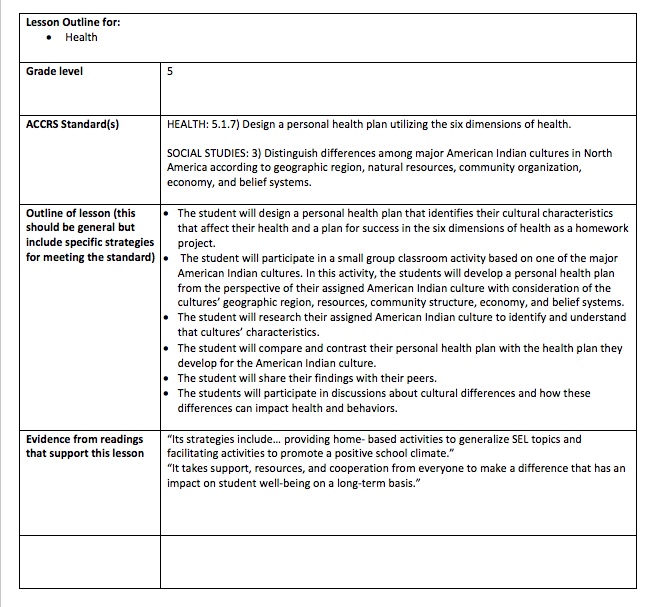
In the article A Culture of Caring, Jennifer Lenz, Lisa Micou, Connie Honsinger, and Rachel Bulifant (2018) explain the importance of social-emotional learning (SEL) in the classroom. SEL is a necessary component for a safe and healthy school environment for everyone involved. One of the SEL curriculums that has proven itself as effective is Caring School Community. The program employs various SEL activities in the classroom, school, and at home. As with any instructional curriculum, there must be a form of assessment of the students’ learning. Some schools implement the Devereux Student Strengths Assessment. This assesses students’ needs as well as their strengths and weaknesses related to SEL. It is also important to involve teachers in reflecting on the curriculum and maintaining personal physical wellness. Through these curriculum programs, parents become more involved and students become more aware of their regulatory zones (angry vs. ready-to-learn).
As a teacher candidate, this article is very interesting to me as student engagement is the center of the learning process. Student engagement requires social-emotional learning that may not come naturally to students. However, one can create habits with repetition and deep understanding. Regulating one’s emotional state can be a learned practice if we incorporate SEL in the classroom and at home. Mental health is essential to learning, and SEL presents a proven path to enhancing mental health.
References
Bulifant, R. Honsinger, C., Lenz, J., & Micou, L., (2018, November/December). A culture of caring. Retrieved from https://www.naesp.org/principal-novemberdecember-2018-safe-healthy-schools/culture-caring
Categories
Module 3
Part 1: Quality Questioning Responses
As a lifelong learner and teacher, I am committed to generating and exercising new critical processes in my students’ thinking. Quality questioning is a great tool for effectively producing new thought processes and critical thinking. This works hand-in-hand with my personal educational philosophy. I will commit to using quality questioning in my classroom by utilizing the 6Ps suggested in the book Quality Questioning. First, I will take the time and effort to strategically plan quality questions and possible scaffolding responses for each question based on the student group I am working with. One of the key features of quality questioning is the inclusion of all students as participants in the response process. This requires a relationship with each student individually as well as a collective classroom culture geared towards finding value in learning and excitement in new discoveries. When presenting the question to the class, I will employ the 4 discrete practices including an expected response structure that enables all students to think further, engaging students in responding, allowing thinking time between questions and responses, and eliciting student responses, especially from non-responders. I will prompt student thinking after allowing thinking time as well as develop follow-up questions to scaffold student understanding for students who may need more guidance in their thought processes. I will then process student responses and facilitate discussions, hoping to lead the students to higher-level thinking. When all is said and done, I will reflect on my questioning practices and set targets for improvement.
The rubric provided in chapter 2 can be used as a tool for modifying and creating effective lessons and quality questions. One of the most important aspects of teaching is reflecting on the effectiveness of your practice. By reviewing the rubric, teachers can better understand where their lessons and quality questions might fall short. It can also help in identifying successes which can be mimicked in other lessons and questions. By aligning the content focus with the instructional purpose and levels of cognitive processing desired teachers can better stimulate and focus their students’ thinking. By analyzing the wording and syntax of lessons and quality questions, teachers can assure the best communication that leads to student comprehension.
The response structures that most resonate with my teaching style are mostly the structures for deep thinking. Developing critical processes in my students’ thinking is a high priority for me as a teacher. I truly believe that every concept presents an opportunity to critically think. I really appreciated a few of the structures, as they were unfamiliar to me before reading this chapter. In line with my love of mathematics and statistics, I will use the Peoplegraphs and Data on Display structures in my classroom. Often mathematics can seem detached from other subjects as well as from students’ real lives. These structures provide a great way to integrate mathematics into other subject areas as well as creating an understand of how math is applied in everyday life. These methods also present an opportunity for students to better their understanding or structure, organization, prioritization, and trends. I appreciate that they also involve physical activity which can accommodate learning styles and disabilities that are more difficult to differentiate. I will also utilize the InkThink structure in my classroom. Students need to actively participate in the building of concepts and scaffolding of ideas. This method is a great way to get students thinking critically about how far an idea can advance and how collaboration can open new doors in thinking. I also like that this activity minimized the need for verbal communication. This will help with students whose strengths lie outside the verbal spectrum. I will likely utilize all of the structures presented in this chapter in the classroom and home in on the structures that work best with each class. In the ever-evolving classroom, it is an advantage to have a wide range of tools to utilize based on the needs of the students.
Thinking back on the lessons that I’ve taught and seen taught, two major benefits of providing Think Times as explained in chapter 4 become apparent. First is the benefit of full class participation. It is easy to fall into the cycle of focusing on students who seem interested and engaged. However, this is selectively educating students and allowing others to fall to the side. The goal should instead be to figure out how to engage all students. By providing Think Time for all students to think in a risk-free environment, all students are inherently engaged. The second benefit I note is forming a habit out of higher-level thinking. The more the students interact on a critical thinking level, the more adept they become at reaching that potential with all questions. I would love nothing more than to have a classroom full of engaged critical thinkers. Through conditioning myself and the students to respect and utilize Think Times and rules for discourse, I will be able to better optimize the learning process and my students’ development.
Chapter 5 emphasizes converting a student response into tangible feedback for both the student and the teacher. This requires multitasking on the teacher’s part. The teacher must maintain focus on the learning goals and the desired cognitive levels of the discussion while constantly analyzing the responses from the students to determine the level of comprehension in the students’ thinking as well as the cognitive level of the students’ thinking. Then the teacher must respond to the possible gaps between these levels and goals and address them before moving the discussion forward as to not abandon any of the students and maximize participation. Personally, I think the most difficult part of this process will be creating scaffolding quickly enough to close the gaps in student knowledge. This will require lots of thinking-on-my-toes which can sometimes be difficult for me as I get into progressing the discussion. However, this process must be implemented to optimize learning and maintain student engagement. To implement this challenging approach in the classroom, I will constantly evaluate student responses and modify my practices to achieve higher quality responses. I will also actively listen and teach my students how to actively listen to their peers and me. Listening is an essential component of evaluation. I will also aim to distribute feedback to my students fairly and consistently. It is important to balance feedback to the students as to not halt the discussion or discourage responsiveness. Scaffolding learning during the response process is also a critical component in progressing the discussion towards the learning goals. Scaffolding fills in the gaps that some students display in understanding. By leveling the playing field, teachers can elevate the discussion to higher level thinking.
Part 2: Quality Questioning Miro Board
Click here to view my Quality Questioning Miro Board
Miro Board offers a relatively user-friendly interface for collaboration and creating visual idea boards. I found that many of the functions within Miro Board mimic Adobe Creative Suite functionality. This is very useful if you are familiar with Adobe. Overall, I found success using Miro Board to scaffold my learning through the book Quality Questioning. It took a few tries to figure out which template to utilize to match my note-taking method. I finally landed on modifying the Business Model Canvas. I wish that it was easier to combine multiple template types together as I could have utilized some webbing within certain notes. However, it did not hinder the effectiveness of the tool.
Part 3: Quality Questioning and Teaching Math Using Number Talks
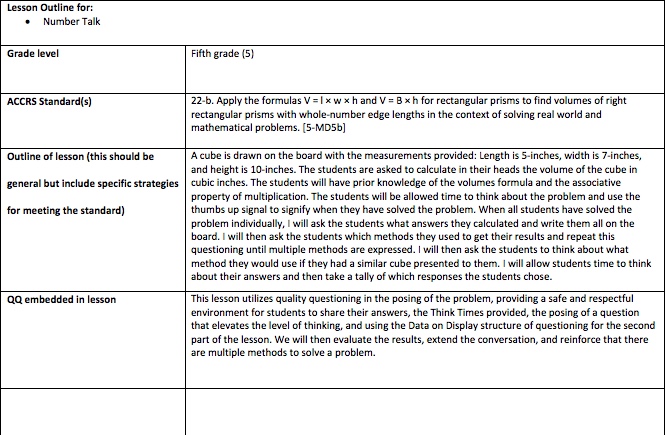
Number talks are a great strategy for developing computational fluency. It provides an opportunity to practice math concepts outside of the context of math instruction. It also allows students to take ownership of their concepts. This is important in not just the development of computational fluency, but also in the assessment of math comprehension. As I tell my nephews, the only way to be good at something is to practice. This is great practice for a lifetime of mathematical understanding.
Part 4: 21st Century Tool Review
socrative.com
The first 21st Century tool I found was Socrative. I saw the tool on the list of response structures in Chapter 3 of Quality Questioning, and then I came across the tool again on Twitter. This meant I had to check it out. I definitely think it’s worth the time to learn about it. Socrative is an assessment app that is very user friendly for both the teacher and the students. It is free for students and has a limited free version for teachers. The Pro version costs $60/year. It requires that students be familiar with their device and general app navigation skills such as clicking and typing. The app allows for quizzes, quick questions, and taking class counts. It also offers the options of presenting the questions as quizzes, races, or class exit tickets. Socrative allows for multiple question types such as multiple choice, true or false, and short answer. This app lends itself to the quality questioning methodology. Creating follow-up questions on-the-fly and monitoring student feedback in real-time are just a couple of the benefits that align with quality questioning. Socrative is sure to engage all of the students in a class in actively assessing and scaffolding their learning. It also encourages students’ self-assessment, which is an essential benefit of quality questioning.
www.polleverywhere.com
The next tool I found is PollEverywhere. I found this app while searching Twitter, as well. It seems like a great way to integrate questions and polling into a presentation or class instruction. It allows for integration into Powerpoint Presentations, which is very useful. It is free for the students to respond either via text message or through a web browser. This means that the students must be familiar with either SMS technology or web browsing, depending on the device they use. PollEverywhere offers a lot of flexibility in design and formatting of questions. However, it is less kid friendly than Socrative seems. Combined with the required knowledge of web browsing, I would only venture to use this platform with students in the upper-elementary levels. It is still a great tool. For teachers to have abundant access to reporting and moderating, the cost is $50/year. Similar in connections with Socrative, PollEverywhere is a great tool for quality questioning. It provides a way for every student to actively engage in the assessment process. Through its integration with Powerpoint, it can be used to continuously assess feedback from students to gauge where they are in reaching the learning goals. This gives the teacher the ability to recognize and close learning gaps as needed. It is also useful to have many question structures available as content is not one size fits all.
Categories
Module 2
Part I – Instructional Models Presentation:
Problem-Based Learning Model
https://youtu.be/dYZdAIbTuEE
Link to view the .pdf of this presentation:
Problem Based Learning Presentation
Links from the presentation:
Part II- 21st Century Tools: TeleStory
I came across the app TeleStory while browsing Facebook. TeleStory is a fun and creative app that allows the user(s) to create television-like videos. The app is user friendly and easy to navigate. The app is free, which makes it even more appealing. It is built for ages 6-8; However, it would work well for slightly younger users with adult assistance and slightly older users, especially ones who are new to audiovisual technology and production. TeleStory works very well with iPads and can also be used on iPhones. TeleStory offers backgrounds, costumes, special effects, and editable cue cards to use during filming. Numerous different “segments” can be filmed and compiled using various backgrounds and costumes. Videos can be exported for sharing, which is important for use in the classroom.
Overall, I give TeleStory five stars. I am excited to see how many ways I can use this app in the classroom. TeleStory requires some basic knowledge of how to navigate interfaces and use buttons. It also requires some creativity on the part of the student. Multiple scenes are offered in four main categories: Star Adventure, The Band, The News, and Eye Spy. The teacher could provide prompts to summarize a battle or war with Star Adventure. The students could create a song about any topic in The Band. The students can evaluate important issues in The News. The teacher can prompt students to create a video that solves a mystery or problem with Eye Spy. These are only a few suggestions to the endless ways this app could be utilized across the curriculum.
TeleStory is particularly useful in utilizing the Problem-Based Learning Model. This app could be used as part of the implementation of the plan to solve the problem. Students could easily record their implementation as a news segment or investigate how to solve the problem like Sherlock Holmes. TeleStory could also be used in the last step of Problem-Based Learning that evaluates the effectiveness of the solution plan. Different members of the student group could be interviewed as a news production. TeleStory compliments Problem-Based Learning. They are both applicable to any subject area where an authentic problem can be presented. This flexibility makes this app very valuable in the classroom. Since the videos can be exported as files, they serve as a great tool for assessment. This is a sure way to engage students in assessing their learning.
Categories
Module 1
Part I – Essential Question “What is 21st Century Teaching and Learning?”
When defining 21st century teaching and learning, many aspects must be considered. First, we should consider what is different about our 21st century world compared to previous times. Technology has existed since the dawn of society as a byproduct of necessity. Innovative thinkers develop tools of technology and technological processes as alternatives and solutions to problems. The 21st century has allowed for the global development of powerful digital technologies at a progressive rate (Kilbane & Milman, 2014). We must then consider the impact this innovation in digital technology has on our knowledge as a population. Our worldviews have become more diverse because of advances in technology and communication. Digital technology supplies us with unlimited amounts of information with the click of a mouse or flick of a finger. Though much of this information is not factual or logically accurate, it is available to us no less. Beyond being able to apply technology and communication tools correctly, we must also consider the new need for the critical processes necessary to discriminate between accurate and inaccurate information. We also need foundational knowledge to use inference when confronting new information. Finally, we must look at the impact technology and new information have on our lives. The results can be for the betterment and to the detriment of our global community. All the same, the impact cannot be ignored. Technology and the rapid acquisition of information are causing major changes in the ways we think and live in the digital era.
Keeping these considerations in mind, 21st century teaching reflects the evolution of digital technology and the changes in how we think and live. Teachers are no longer the primary source of content in a student’s life. Though this can be viewed as relief from some of the responsibilities of teaching in the past century, it has also developed a new set of teacher responsibilities and priorities. As defined by the International Society for Technology in Education (ISTE), the teacher must now fulfill the roles of learner, leader, citizen, collaborator, designer, facilitator, and analyst in order to effectively and efficiently instruct 21st century learners (ISTE 2019). The teacher must also combine these roles to generate student engagement. This facilitates a shift from content-centered instruction to learner-centered, individualized instruction. The aforementioned instructional shift in conjunction with the digital era demands that teaching includes differentiated instruction as well as emphasis on instructional design. This focuses on the actual process of teaching more than simply using popular instructional models to relay content. Kilbane and Milman write that “a new mind-set, an expanded skill-set, and a high-quality tool set are essential for effective teaching in the 21st century” (2014, page 7).
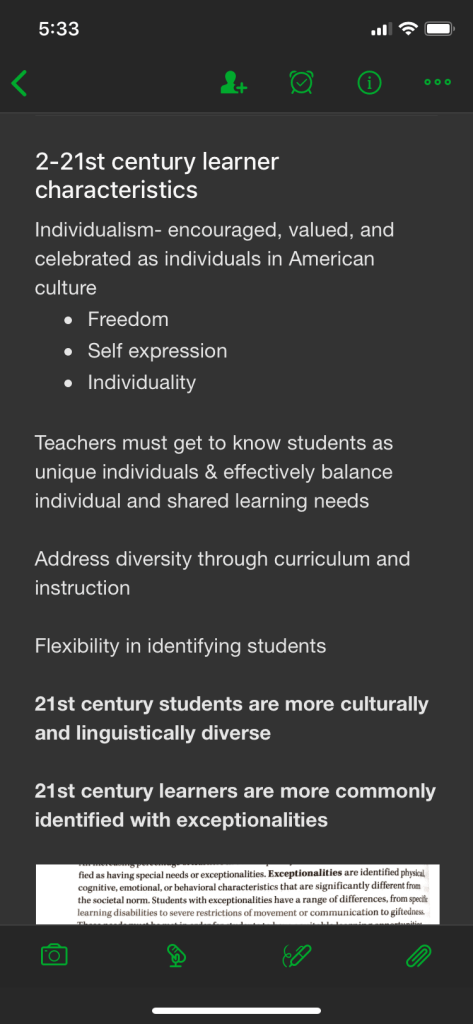
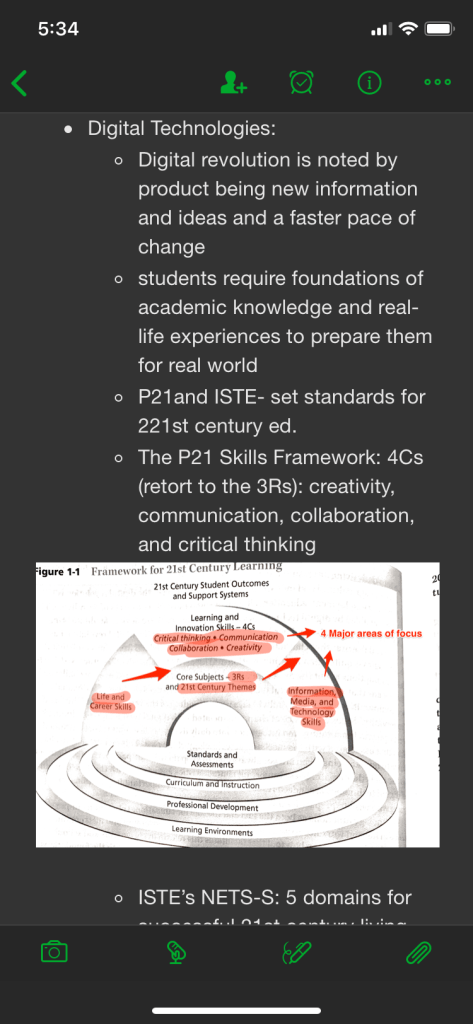
In turn, 21st century learning goes beyond the traditional memorization, understanding, and evaluation of content. 21st century learning requires that students are prepared for successful 21st century living and learning. This preparation includes critical thinking skills in knowledge acquisition, technology usage, and combining the two. Learners must be engaged in the learning experience and possess the knowledge of how to use technological tools for both personal and educational purposes and communication. 21st century learning encompasses a greater diversity of student populations than seen in the past. This means that learning is more customized for individuals than in the past. It also implies that students must learn how to communicate with a larger demographic of peers. ISTE defines student standards for 21st century learning in five domains: “creativity and innovation, communication and collaboration, research and information fluency, digital citizenship, [and] technology operations and concepts” (Kilbane & Milman, 2014, page 7). These domains differ from the focuses of learning in the 20th century. Technology and digital citizenship were not imperative to success in much of the 20th century. The integration of technology in our daily lives requires us to be able to communicate and collaborate. These domains are the focus of learning in the digital era.
References
Kilbane, C. R., & Milman, N. B. (2014). Teaching models: designing instruction for 21st century learners. Upper Saddle River, NJ: Pearson Education, Inc.
ISTE standards
for educators. (2019). Retrieved from https://www.iste.org/standards/for-educators
Part II – Evernote Strategy
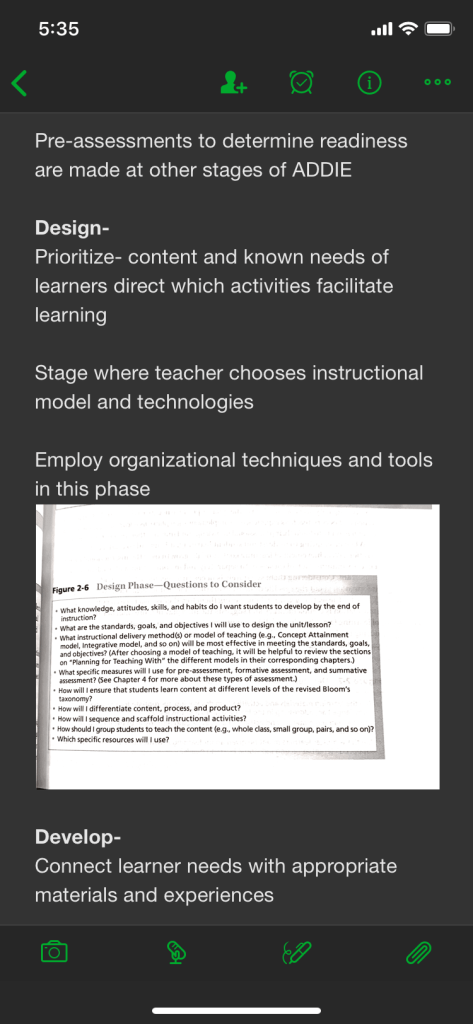
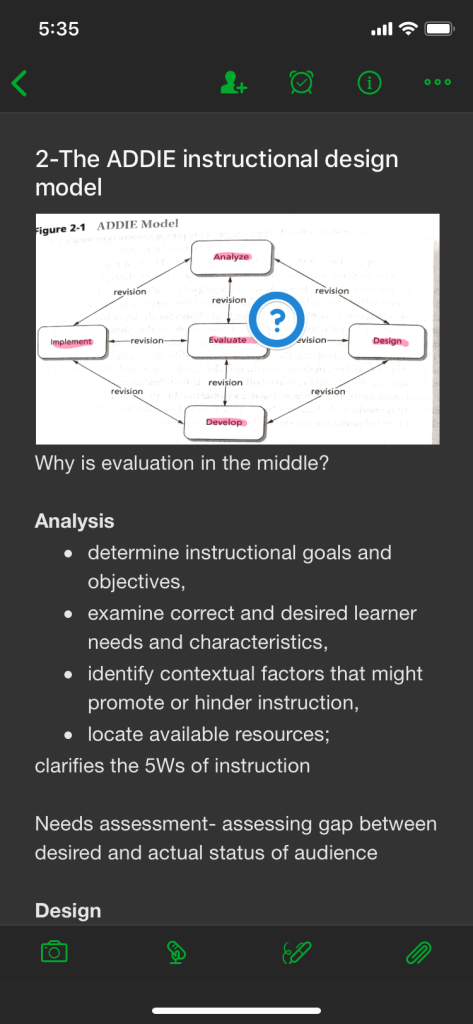
I started this module with some prior knowledge of Evernote. In 2015, I began using Evernote to collect information for work and recipes for cooking. However, I had not used it in an academic setting, so there was a bit of a learning curve in this module. Evernote offers a user-friendly way to compose and organize notes. Though I had some trouble transferring the notes back and forth between my phone and computer (there is a time lag on updating the information which leads to the creation of “conflicting” notes), I ultimately used my phone to take notes and images of figures. I was then able to annotate these images on both devices. Having the ability to annotate images of figures from the book was beneficial to the learning process. I was able to use multiple learning styles, particularly a combination of visual and kinesthetic learning, to assist in analyzing and evaluating the information from the text. It is particularly difficult to initialize kinesthetic learning methods in much of my school work. By using Evernote, I was allowed to physically interact with the text. The search feature was also helpful in referencing previously covered information. This referencing lead to a deeper connection to the information as a whole. Overall, I would classify Evernote as a tool for increased learning and understanding in my studies.
In my
classroom, I would use Evernote as a tool for learning and collaboration amongst
my students to strengthen their technological knowledge as well as their
content knowledge. Allowing each student to document their learning in
notebooks in Evernote is a great method for interacting with multiple informational
sources. It also actively engages students in the research and note taking
process. Notebooks could be used to compile research on a topic from various
sources. The students can take notes, screenshots, create lists, and photograph
text or relevant images. Evernote also allows for the sharing of notes and
notebooks. This could be assistive in collaboration between students. Students
could work collaboratively to create notes and notebooks and then share the
work on their individual devices. The notes could also be created individually
and then shared for a collaborative follow-up activity or project. Both of
these methods lead the students to a deeper understanding and evaluation of the
material.
Part III 21st Century Tool Review: Flocabulary.com
Flocabulary.com is a website I discovered while browsing Facebook that provides hip-hop videos about all sorts of subject matter. The site can be best used to supplement lessons in just about any content that the videos cover. The site also includes vocabulary cards and games, quizzes, and a lyrics lab for each video. For teachers, the site also provides standards alignment information and .pdf handouts.
Flocabulary.com can be used with any pedagogy where student engagement is valued. Though the site is mostly video-based with the ensuing visual and auditory interaction, students can interact with the vocabulary, quiz, and lyrics lab options to gain a deeper understanding of the material and assess this understanding. The site can be used on an individual basis or in a group setting. It offers flexibility in how it can be utilized in the classroom. Personally, I would use the tool for the introductory portion of a lesson or unit and use the assistive tools to identify the strengths and weaknesses of learners’ understanding. I’ve seen videos of teachers using the songs during other games and activities and teaching the songs to the students. I would like to use the site as these teachers did or have a dance party associated with the videos in my classroom.
To use Flocabulary.com correctly, students would need a few technology skills. First, they would need to be familiar with how to use a web browser to access the site if they were working with it independent of the teacher. The site does provide a way to assign videos to students. This would mean that the students would need to be familiar with the user interface of the site. Overall, the site is very user-friendly and does not require much more than these basic understandings.
Categories
All About Me
You’ll never be bored when you try something new. There’s really no limit to what you can do!
— Dr. Seuss
Hi! My name is Beth Rush. Subscribe below to get notified when I post new updates and follow me on twitter to get recent tweets (button on home page)!
Digital collage and presentation are great tools for the elementary classroom. It is essential for learners to discover as many technologies and digital tools as possible in the twenty-first century classroom. After all, this is likely what their futures will involve.
I found that digital collaging has many useful aspects for learners. From simply navigating the apps/software to applying the varying critical processes and decision-making skills of design, digital collage can be a very helpful tool in introducing students to fun and exciting new ways to use technology in their lives. I also found that building the presentation on Animoto was a fresh and challenging experience. This is an excellent way to challenge learners while they are actively engaged. I would love to utilize this tool as an icebreaker and throughout the year in all subjects. It’s important for learners to understand that technology is dynamic and can be used both personally and academically. As a teacher, it is my responsibility to build that bridge.
 Beth Rush Teaches